LEARN MORE

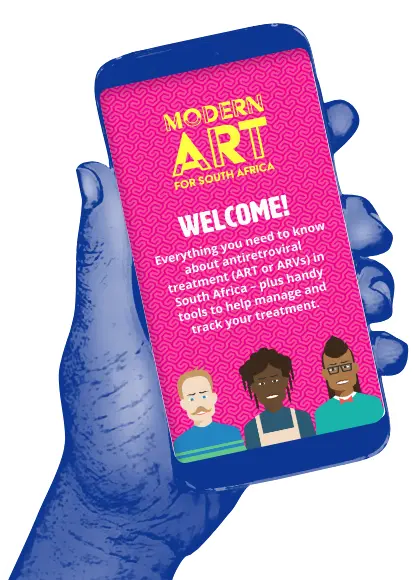
Learn about the free Modern ART web-app which features information about ART and tools like adherence trackers, reminders and pill counters.
Learnmore
now
-
The Modern ART web-based app is here!
It’s 100% free!
The web app is made to use as little data as possible. Use in your browser, or add to your home screen/desktop to use like an app.
-
What you’ll find…
- All the latest info on antiretroviral treatment (ART), presented in a clear and simple way.
- Tools to manage your ART and health checks – including a pill counter and adherence reminders.
- Other people’s treatment stories, and treatment-related news.
The website offers news about our activities, all the latest treatment information, and a member section where you can use tools to track pill stock, capture test results and track adherence.
-
A website and an app in one!
It works just like an app, but it’s on the web, so you don’t have to download or store it on your phone. Open your internet browser, and go to modernartforsouthafrica.co.za. Easy as that!
- If it’s on your browser only, notifications will only work if the website is open.
- To get notifications on your phone, add the app to your homescreen.
-
How to add the app to your phone
Chrome
- Open the website in Chrome
- Tap the menu icon (three dots)
- Select “Add to Home Screen”
- Name your shortcut & tap “Add”
Safari (iPhone)
- Open the website in Safari
- Tap the share icon (box with arrow)
- Scroll down & tap “Add to Home Screen”
- Name your shortcut & tap “Add”
Samsung Internet
- Open the website
- Tap the menu icon (three lines)
- Select “Add page to”, then “Home screen”
- Confirm by tapping “Add”
-
Getting started
- Find the icon on your phone & tap it.
- Be sure to allow notifications. They are for your tools.
- Take the app tour.
- Start finding out more about everything treatment-related in South Africa!
-
Five sections
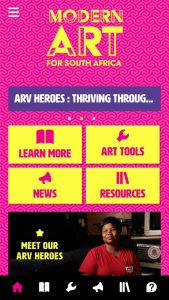
The app has five main sections; access them by tapping the icons on the bottom bar:
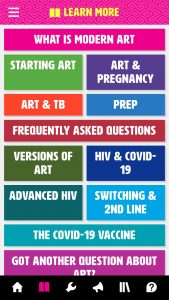
- LEARN MORE: treatment info. Uses very little data.
- ART TOOLS: personal treatment tools & profile.
- NEWS: latest activities & news.
- RESOURCES: colourful treatment booklets & videos. Uses more data than the LEARN MORE section.
- ARV HEROES: meet other people in SA who are on treatment.
-
The hamburger menu
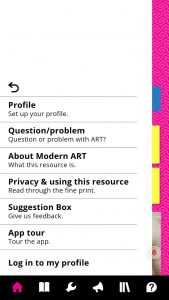
Tap on the hamburger menu at the top left of your screen to give us suggestions about the app, ask a treatment question, take a tour, or access your profile.

-
Learn more
All the latest info on antiretroviral treatment, arranged by topic, in a special simple format that uses very little data. Just tap and go!
-
ART tools
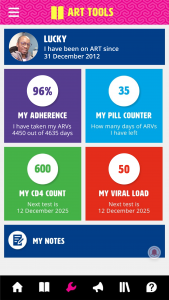
Set up your tools here:
- Profile: update your details.
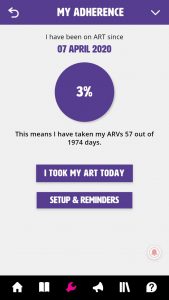
- My adherence: set up an adherence tracker and reminders to take ART.
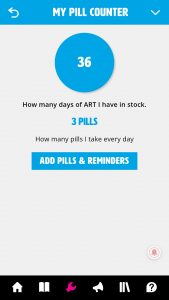
- My pill counter: set up a pill counter and reminders for when you run low.
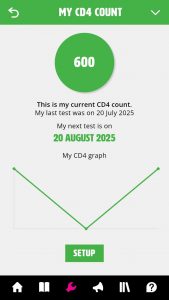
- My CD4 count: keep track of your CD4 and set up test reminders.
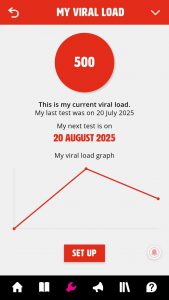
- My viral load: keep track of your viral load and set up test reminders.
- My notes: make notes about your treatment here, e.g. questions to ask your doctor.
-
My adherence
To set up your adherence tracker, enter the date you start using the app and what time of day you want a reminder to take your ART. Tap “Update” to begin.
Your adherence days start counting from the day you do the above. This shows you how well you’re doing, to motivate you.
-
My pill counter
This tool keeps track of how many pills you have and reminds you to restock. Enter the number of pills you collect, how many you take daily, and reminders to restock.
-
My CD4 count
Your CD4 count tells you how many white blood cells are fighting HIV in your immune system.
It will help you set reminders for test dates and keep track of when you last had a test. It also shows a graph to monitor CD4 count.
Everyone with HIV needs to take ART, no matter what their CD4 count.
-
My Viral Load
Viral load tests measure the amount of HIV in your blood. On ART, viral load should be under 50 or 200 copies/mL, depending on the test.
Like the CD4 Counter, this tool helps you set reminders for test dates and keep track of when you last had a test. A graph tracks your viral load test results.
Everyone with HIV needs to take ART, no matter what their viral load.

Art tools in
your hand!
Add the website on your phone’s home screen to use the handy ART tools to help manage and track your treatment.